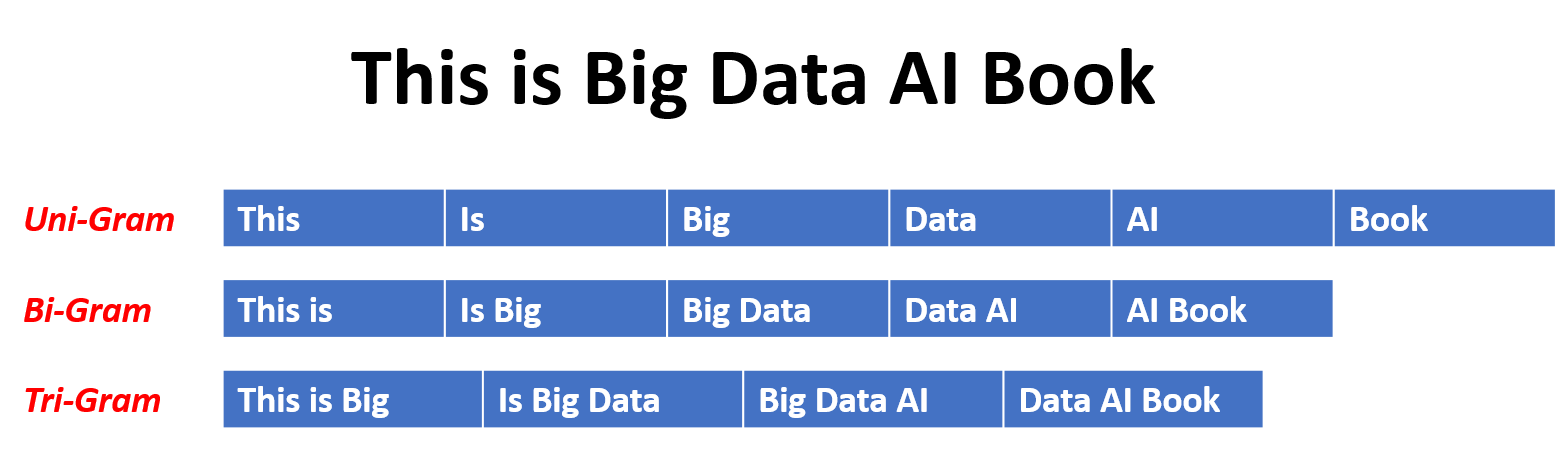
To generate unigrams, bigrams, trigrams or n-grams, you can use python’s Natural Language Toolkit (NLTK), which makes it so easy.
First steps
Run this script once to download and install the punctuation tokenizer:
import nltk
nltk.download('punkt')
Unigrams, bigrams and trigrams
By using these methods you will get the lists for each:
from nltk import word_tokenize, bigrams, trigrams

unigrams = word_tokenize("The quick brown fox jumps over the lazy dog")
bigrams = bigrams(unigrams)
trigrams = trigrams(unigrams)
Hint for unigrams
For simple unigrams you can also split the strings with a space.
n-grams
To generate 4-grams (n = 4):
from nltk import word_tokenize, bigrams, trigrams

unigrams = word_tokenize("The quick brown fox jumps over the lazy dog")
four_grams = list(ngrams(unigrams, 4))
n-grams in a range
To generate n-grams for m to n order, use the method everygrams:
Here n=2 and m=6, it will generate 2-grams,3-grams,4-grams,5-grams and 6-grams.
from nltk import word_tokenize, everygrams

unigrams = word_tokenize("The quick brown fox jumps over the lazy dog")
grams_2_to_6 = list(everygrams(unigrams, 2, 6))
Real-World Applications
N-grams are used in many NLP tasks:
- Language Detection: Identify the language of a text based on character or word n-gram patterns
- Spell Checking & Correction: Find most likely next word to correct misspellings
- Machine Translation: Predict probability of word sequences
- Sentiment Analysis: Use n-grams as features for classification
- Text Prediction & Auto-complete: Suggest next words based on bigrams or trigrams
- Plagiarism Detection: Compare n-gram patterns between documents
- Information Retrieval: Index and search documents using n-gram frequencies
Working with N-gram Output
Let’s look at practical examples with actual output:
from nltk import word_tokenize, bigrams, trigrams
from collections import Counter

text = "The quick brown fox jumps over the lazy dog. The dog was very lazy."
tokens = word_tokenize(text.lower())

# Get bigrams and their frequencies
bigram_list = list(bigrams(tokens))
bigram_freq = Counter(bigram_list)

print("Bigrams:", bigram_list)
print("\nMost common bigrams:")
for bigram, freq in bigram_freq.most_common(5):
    print(f"{bigram}: {freq}")
Output:
Bigrams: [('the', 'quick'), ('quick', 'brown'), ('brown', 'fox'), ...]

Most common bigrams:
('the', 'dog'): 2
('the', 'quick'): 1
('quick', 'brown'): 1
...
Custom N-gram Implementation
If you prefer not to use NLTK or need a lighter implementation:
def generate_ngrams(text, n):
    """Generate n-grams from text without NLTK"""
    words = text.lower().split()
    return [tuple(words[i:i+n]) for i in range(len(words)-n+1)]

text = "the quick brown fox jumps over the lazy dog"

# Generate different n-grams
unigrams = generate_ngrams(text, 1)
bigrams = generate_ngrams(text, 2)
trigrams = generate_ngrams(text, 3)

print("Bigrams:", bigrams)
# Output: [('the', 'quick'), ('quick', 'brown'), ('brown', 'fox'), ...]
Handling Edge Cases
When working with n-grams, consider these important points:
1. Punctuation & Tokenization
from nltk import word_tokenize
import string

text = "Hello, world! How are you?"

# Without proper tokenization, punctuation stays
print(text.lower().split())  # ['hello,', 'world!', 'how', ...]

# With NLTK tokenization
tokens = word_tokenize(text.lower())
print(tokens)  # ['hello', ',', 'world', '!', 'how', ...]

# Remove punctuation if needed
clean_tokens = [w for w in tokens if w not in string.punctuation]
2. Stopwords
from nltk.corpus import stopwords

stop_words = set(stopwords.words('english'))
filtered_tokens = [w for w in tokens if w not in stop_words]
3. Minimum Frequency Filtering
from collections import Counter

bigram_freq = Counter(bigrams(tokens))
# Keep only bigrams that appear at least 2 times
frequent_bigrams = [bg for bg, count in bigram_freq.items() if count >= 2]
Performance Tips
-
For large texts: Use generators instead of lists to save memory
bigrams_gen = bigrams(tokens) # Returns a generator, not a list -
Use Counter efficiently:
# More efficient for frequency analysis from collections import Counter freq = Counter(bigrams(tokens)) -
Vectorization with sklearn:
from sklearn.feature_extraction.text import CountVectorizer

vectorizer = CountVectorizer(ngram_range=(1, 2))  # unigrams + bigrams
X = vectorizer.fit_transform([text])
Common Mistakes to Avoid
- Forgetting to tokenize properly: Using simple
split()can leave punctuation attached - Not handling case sensitivity: Always normalize text to lowercase for consistency
- Including stopwords: Often skew results; remove them unless analyzing function words
- Not considering corpus size: N-gram frequencies need sufficient text to be meaningful
- Ignoring low-frequency n-grams: They may be noise rather than patterns
Next Steps
- Explore language models using n-grams for text generation
- Try Markov chains for probabilistic text generation
- Experiment with character-level n-grams for tasks like language detection
- Use TF-IDF weighted n-grams for better feature extraction
More info about the nltk can be found here
Discussion
Comments are not enabled on this build. Production uses Giscus (GitHub Discussions) when the repository secrets are set.